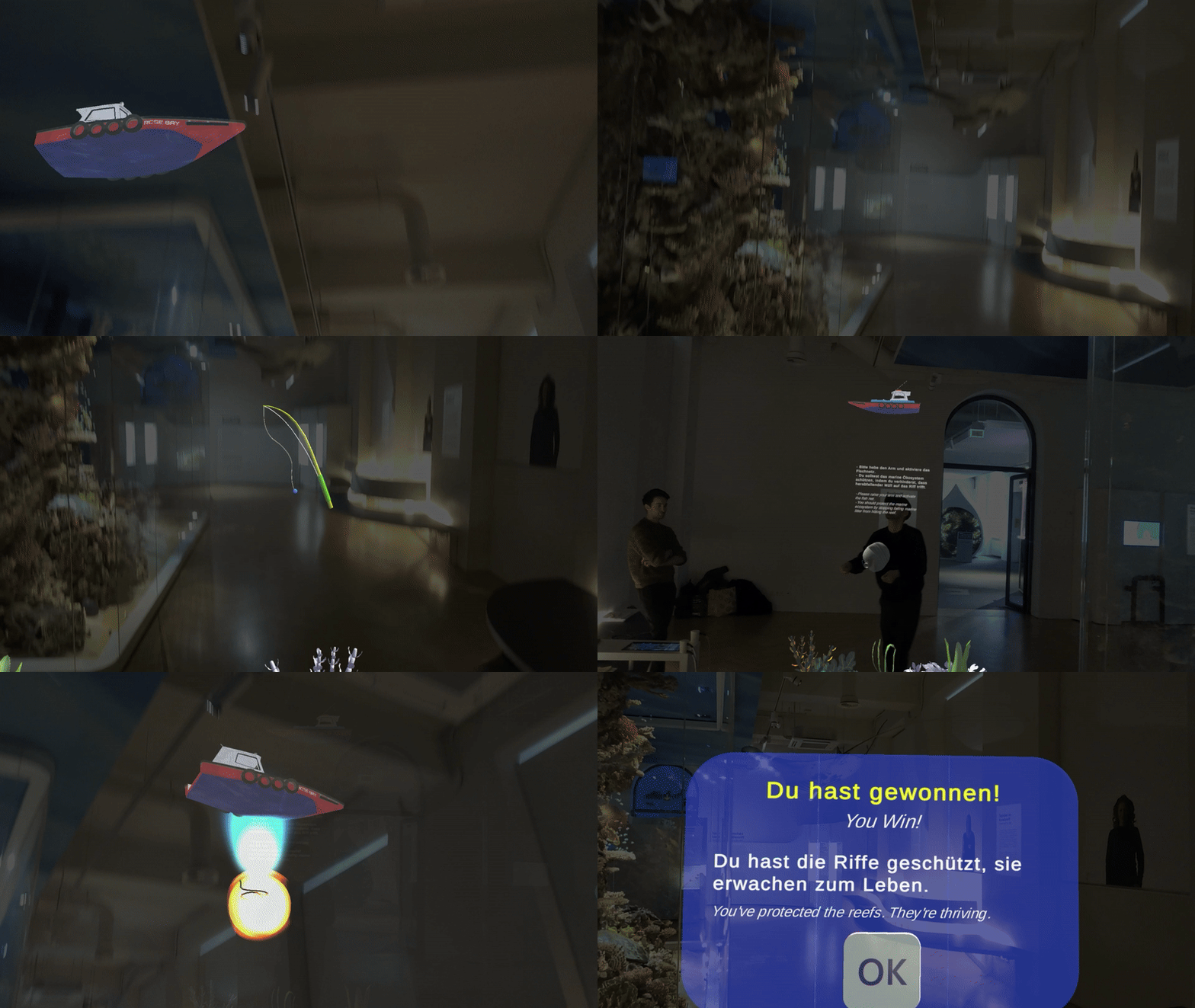
Object Catching
A protective AR interaction where visitors catch, block, deflect, or neutralize incoming virtual threats.
Name
AR Object Catching
Level and Category
Application-level pattern under the category-level class Experience Presenter.
Intent
Turn invisible, abstract, or slow-moving threats to an exhibit or represented environment into dynamic AR objects that visitors can catch, block, deflect, or neutralize through embodied interaction, thereby making risk, protection, and mitigation more tangible.
Rationale
Some museum topics are difficult to communicate because the relevant threats are not directly visible in the exhibit. Environmental hazards such as pollution, ghost nets, environmental stress, invasive species, or climate-related stressors may be scientifically important but perceptually absent, temporally delayed, or spatially remote.
AR Object Catching translates these hazards into visible and interactive objects that move toward a vulnerable exhibit zone. By asking visitors to intercept or neutralize them, the pattern connects learning to bodily action and gives visitors a direct sense of agency. The interaction should not only create challenge, but also help visitors understand what is being threatened, why it matters, and how protective action changes the outcome.
Mechanic-based interaction logic
This pattern is based on an object-catching and protection mechanic. Visitors block, catch, redirect, or neutralize virtual threats that move toward vulnerable exhibit zones. The mechanic links embodied response, focused protection, time pressure, and immediate feedback to the interpretive goal of making abstract threats visible, urgent, and connected to possible action.
Problem
Visitors may find invisible, abstract, or slow-moving threats difficult to understand when they are represented only through static panels, text, images, or passive visualizations. Environmental or cultural threats may feel distant from the physical exhibit, reducing urgency, empathy, and perceived agency.
In HMD-based AR, these threats can be visualized in situ, but a passive overlay may still leave visitors as observers. A more active interaction structure is needed when the learning goal involves protection, mitigation, response, or the consequences of action and inaction.
Context
This pattern applies to HMD-AR museum experiences in which an exhibit represents a vulnerable organism, habitat, artifact, cultural site, or environment affected by visible or invisible threats. It is especially relevant for natural-history, ecology, climate, conservation, heritage-risk, or science-communication exhibits.
The pattern assumes that the system can spawn virtual objects or effects, track simple visitor gestures or body positions, detect interception or collision events, and represent a vulnerable zone or protected target in relation to the physical exhibit.
Use When
Use this pattern when:
- the exhibit topic involves threats, risk, vulnerability, protection, or mitigation;
- the threat is difficult to perceive directly in the physical exhibit;
- visitors should learn through active response rather than passive observation;
- simple embodied actions, such as catching, blocking, swiping, or neutralizing, can represent the desired protective behaviour;
- the experience can remain short, safe, and manageable in a public exhibition setting.
Do not use this pattern when the topic is too sensitive for game-like treatment, when rapid gestures may be unsafe in the exhibition space, when tracking latency would make interception unreliable, or when the educational goal requires slow reflection rather than fast action. It may also be unsuitable in crowded galleries or around fragile exhibits if the interaction encourages broad arm movements or rapid body motion.
Forces
- Urgency vs. comfort: Threats should create a sense of immediacy, but not make visitors anxious, rushed, or physically unsafe.
- Engagement vs. conceptual clarity: The game mechanic should reinforce the environmental or interpretive message rather than become a generic catching game.
- Challenge vs. accessibility: The interaction should be active and rewarding, but remain manageable for first-time HMD users and visitors with different physical abilities.
- Realism vs. recognizability: Threat objects should be recognizable and meaningful, but may need stylization to remain visible and catchable in AR.
- Feedback immediacy vs. system robustness: Catching and blocking require fast visual and audio feedback; latency can break cause-and-effect perception.
- Emotional impact vs. overload: Missed threats can show negative consequences, but the system should avoid overwhelming visitors with failure states.
- Movement freedom vs. museum safety: Gestures should be limited to a safe interaction volume and should not encourage visitors to step into obstacles, other visitors, or restricted areas.
Solution
Represent threats as virtual objects or effects that move toward a vulnerable exhibit zone. The visitor is asked to catch, block, deflect, or neutralize these threats through simple embodied actions, such as reaching out, swiping, holding up a hand, tapping a virtual object, or moving into a protective position. The vulnerable zone should be clearly indicated, for example through a glow, pulse, shield outline, exhibit-status indicator, or target highlight.
The interaction should begin with a short explanation or animated prompt that shows what the threats are and how the visitor can respond. Early threats should move slowly and follow predictable paths so that visitors can learn the gesture. As the session progresses, the system may increase difficulty through faster movement, multiple simultaneous threats, different threat types, or partial visual obstruction.
Each intercepted threat should produce immediate feedback, such as disappearance, deflection, particle burst, sound cue, score update, or visible improvement of the protected exhibit zone. Missed threats should also have visible consequences, such as reduced health, dimmed colours, damaged coral, or a warning cue.
The experience should end with a short follow-up explanation. This may include the number of intercepted threats, a reef health or protection score, a visual before-and-after comparison, and a concise conservation or mitigation message. The final summary should connect the embodied game action back to the real-world issue represented by the exhibit.
Design Parameters and Recommended Settings
- Threat type: Use virtual objects or effects that clearly represent the issue, such as plastic waste materials, ghost nets, pollution effects, invasive species, heat waves, pollutants, or symbolic hazard particles.
- Threat speed: Start with slow movement, for example approximately 0.5 m/s, and increase gradually if the visitor succeeds. A small increase, such as 0.1 m/s every 20 seconds, can create progression without sudden sudden increases in difficulty.
- Spawn rate: Begin with single threats and increase spawn frequency only after visitors have understood the interaction. Avoid spawning so many objects that the scene becomes chaotic.
- Threat path: Direct threats toward meaningful vulnerable zones, such as coral, a habitat area, an organism, or a protected artifact. Paths should be predictable enough for first-time users to intercept.
- Interaction volume: Keep catching and blocking actions within a safe reach zone in front of the visitor. Avoid gestures that require turning quickly, stepping backward, or swinging arms widely.
- Gesture type: Use simple gestures such as reaching, touching, swiping, blocking, or holding. Avoid complex gesture combinations unless a short practice phase is provided.
- Highlight radius: Use a glow or pulse around vulnerable zones, for example approximately 0.5 metres, to show where threats are heading and what needs protection.
- Feedback delay: Keep the delay between gesture and visual or audio response very low, ideally below 0.1 seconds, so that visitors perceive a direct causal relation.
- Session duration: Keep the main interaction short, typically around 60–120 seconds, to sustain urgency while fitting normal museum attention spans.
- Difficulty progression: Adjust speed, number of threats, threat types, or visual complexity gradually. Difficulty should support engagement, not exclude slower or less confident visitors.
- Health or progress indicator: Provide a simple indicator such as reef health, protection level, number of caught objects, or remaining time. The indicator should be readable without dominating the scene.
- Missed-threat feedback: Show consequences when threats are missed, but avoid overly harsh or discouraging feedback. The aim is to communicate vulnerability and mitigation, not failure.
- Wrap-up content: Present a short result summary and one or two actionable conservation or learning points after the session.
- Fallback behaviour: If gesture tracking becomes unreliable, reduce threat speed, enlarge interception zones, simplify gestures, or allow gaze- or button-based neutralization.
Consequences
When applied successfully, AR Object Catching can make invisible or abstract threats visible, urgent, and personally actionable. It supports embodied learning by linking visitor action to changes in the exhibit state and can strengthen empathy toward vulnerable environments, organisms, or cultural resources. The pattern can also increase engagement by combining movement, challenge, feedback, and interpretive consequence within a short museum interaction.
However, the pattern also introduces risks. Poor hand tracking, slow feedback, or ambiguous collision detection can quickly reduce trust and cause frustration. If the game becomes too fast, too visually busy, or too competitive, visitors may focus on score and reaction speed rather than the exhibit meaning. If the threat metaphor is poorly chosen, the interaction may reduce the perceived seriousness of the issue or misrepresent the real-world process. The pattern therefore requires careful tuning of threat representation, gesture simplicity, response delay, challenge progression, safety boundaries, and educational wrap-up.
Related Patterns
- Preceding activation patterns
- Step-In Trigger can precede AR Object Catching by activating the protective interaction at a safe standing position.
- Exhibit Knowledge Trigger can precede AR Object Catching when a short concept-specific action should introduce the threat or vulnerable zone before the main challenge begins.
- Preceding guidance patterns
- Avatar Guide can indirectly precede AR Object Catching by guiding visitors to the location where the protective interaction should take place.
- Forward Cue-Routing can indirectly precede AR Object Catching by guiding visitors through lightweight route cues before activation and presentation.
- Complementary presentation patterns
- Sequential Explanation can be used before the task to explain the threat, during the task to stage difficulty, or after completion to summarize the ecological or cultural meaning.
- AR Labelling can identify vulnerable exhibit parts, threat sources, or protected zones before the catching interaction begins.
- Related playful presentation patterns
- AR Exhibit Reassembler is a related playful presentation pattern, but it focuses on reconstruction rather than active protection against incoming threats.
- AR Exhibit Feature Drawing is a related playful presentation pattern, but it focuses on creative marking or speculative feature interpretation rather than catching or deflecting threats.
Composition Notes
AR Object Catching is usually used as the main exhibit-centred interaction after the visitor has reached and activated a point of interest. A typical composition is:
PoI Guide → Experience Indicator → AR Object Catching
For example:
Avatar Guide / Forward Cue-Routing → Step-In Trigger / Exhibit Knowledge Trigger → Sequential Explanation → AR Object Catching → Wrap-up
The interaction should be framed carefully. It should not only ask visitors to catch objects, but should clarify what the objects represent, why the protected zone matters, and what the outcome means. If the session includes scoring, the score should be tied to interpretive feedback, such as habitat health or prevented damage, rather than presented as an isolated game result.
After the session, the system should return attention to the physical exhibit through a summary, comparison, label layer, or short conservation message.
Implementation Alignment
The pattern can be implemented as a reusable object-catching or threat-defence module or Unity prefab that combines:
- threat spawning;
- movement paths;
- collision or interception detection;
- gesture tracking;
- vulnerable-zone logic;
- difficulty progression;
- feedback effects;
- health or score tracking;
- session timing;
- wrap-up display;
- event-based transitions.
Relevant exposed parameters include threat prefab list, spawn positions, threat speed, spawn rate, path target, vulnerable-zone radius, interception threshold, gesture type, feedback effect, audio cue, session duration, difficulty curve, health indicator, score logic, missed-threat consequence, wrap-up text, and fallback mode.
Implementation-level events may include:
- object-catching started;
- threat spawned;
- threat approached zone;
- gesture detected;
- threat intercepted;
- threat missed;
- zone damaged;
- zone restored;
- score updated;
- difficulty increased;
- session timer ended;
- wrap-up opened;
- tracking unstable;
- object-catching exited.
These events can support debugging, system logs, observation sheets, and later evaluation of interception rate, missed threats, gesture recognition errors, response latency, session completion, difficulty balance, and transition success.
Example Use
In a natural-history museum, visitors encounter a coral reef exhibit that is extended through an AR protection game. After activation, virtual plastic debris and abandoned objects begin drifting toward the coral reef model. Vulnerable reef zones pulse softly to show where protection is needed.
The visitor catches or swipes away the incoming threats with simple hand gestures. Each successful interception produces an immediate particle burst, a short sound cue, and a visible improvement in reef health. Missed threats cause subtle dimming or damage feedback. After the short session, a wrap-up screen shows how many threats were intercepted, the final reef-health score, and a concise conservation message connecting the interaction to real-world environmental protection.
