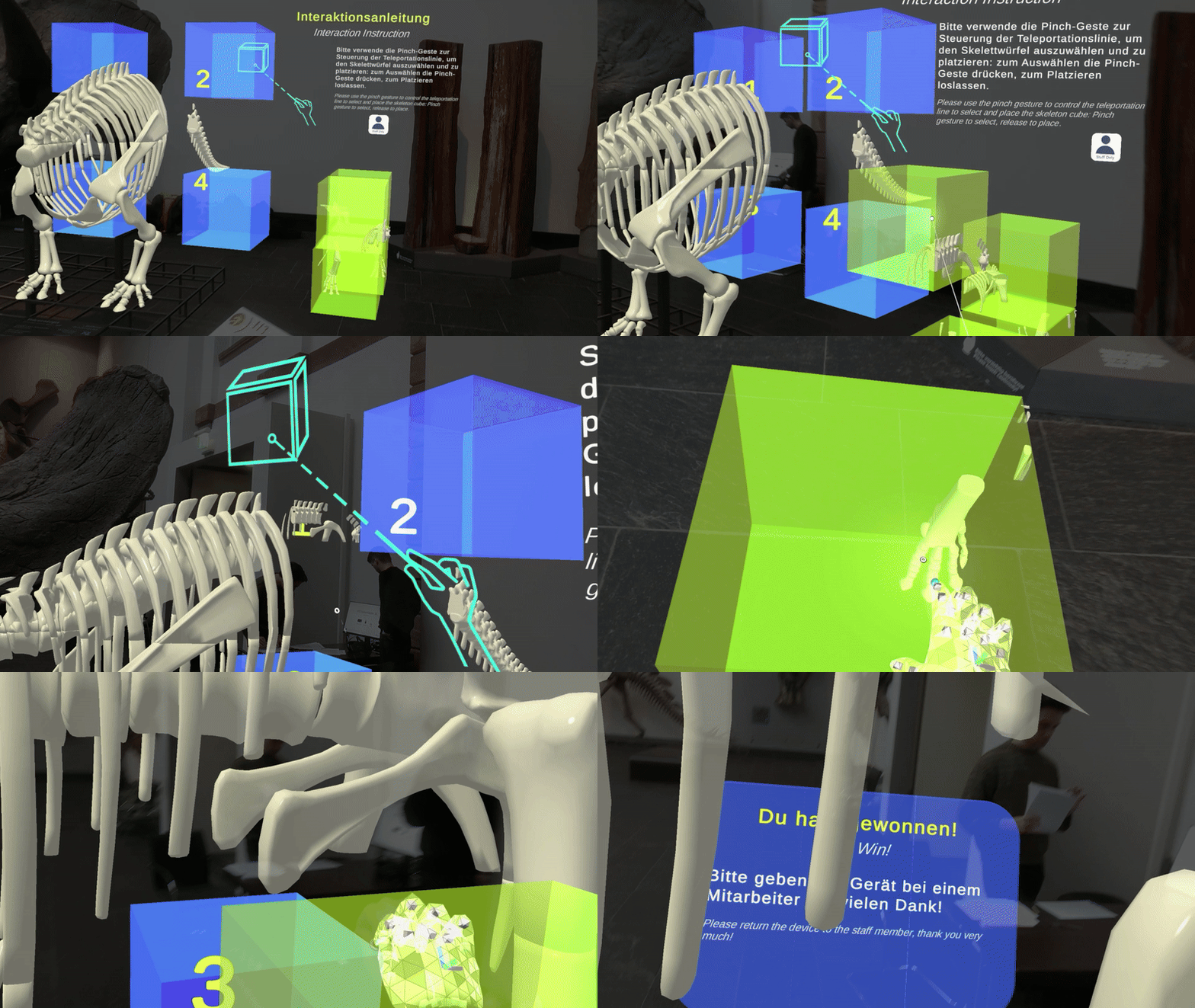
Exhibit Reassembler
A puzzle-like AR interaction where visitors reconstruct missing or fragmented exhibit components.
Name
AR Exhibit Reassembler
Level and Category
Application-level pattern under the category-level class Experience Presenter.
Intent
Enable visitors to virtually reconstruct missing or fragmented exhibit components through an interactive AR assembly task, deepening their understanding of the exhibit’s complete form, part-whole relations, and structural significance.
Rationale
Some museum exhibits are incomplete, fragmented, damaged, or difficult to understand as a whole from the physical remains alone. Fossils, machinery, historical objects, archaeological fragments, and reconstructed scientific objects often require visitors to imagine missing components and spatial relationships.
AR Exhibit Reassembler turns this gap in understanding into an active reconstruction task. Instead of only showing the completed form, the pattern lets visitors participate in assembling it. This can support spatial reasoning, part-whole understanding, and memorable engagement while keeping the reconstructed elements anchored to the physical exhibit.
Mechanic-based interaction logic
This pattern is based on a reconstruction and puzzle-assembly mechanic. Visitors manipulate, align, and place virtual fragments in relation to an incomplete exhibit. The mechanic links piece matching, spatial arrangement, testing and adjustment, and progression feedback to the interpretive goal of understanding the exhibit as a reconstructed whole.
Problem
When only partial physical artifacts are on display, visitors may struggle to grasp the complete structure, the relationships between parts, or the significance of missing components. Static reconstructions or explanatory panels can show the final result, but they may not help visitors understand how the parts fit together.
In HMD-based AR, simply overlaying a completed reconstruction can also become non-interactive. A more interactive structure is needed when visitors should actively explore how virtual pieces relate to the physical artifact and to one another.
Context
This pattern applies to HMD-AR museum experiences in which an exhibit contains missing, fragmented, disassembled, or reconstructable components. It is especially relevant for fossils, skeletal structures, machines, tools, historical objects, archaeological objects, damaged artifacts, or scientific models where digital reconstruction data is available.
The pattern assumes that virtual pieces can be spatially registered to the physical exhibit or to a stable reconstruction area, and that visitors can manipulate pieces through hand interaction, gaze-assisted selection, simplified dragging, or another suitable HMD input method.
Use When
Use this pattern when:
- visitors encounter an exhibit with substantial missing or fragmented elements;
- the learning goal is to understand the overall structure through participatory assembly;
- part-whole relationships are important to the interpretation of the exhibit;
- the museum wants to transform passive viewing into active reconstruction;
- virtual fragments can be aligned with stable docking regions or target positions;
- the task can be completed within a short museum interaction time.
Avoid using this pattern when spatial registration is too unstable for meaningful assembly, when the number of fragments would make the task too long, or when manipulation would distract from rather than clarify the exhibit. It may also be unsuitable when the exhibit’s interpretive value depends more on open-ended interpretation than on structural reconstruction.
Forces
- Engagement vs. complexity: The assembly task should be engaging, but not so difficult that visitors become frustrated.
- Accuracy vs. playfulness: The reconstruction should remain scientifically or culturally meaningful while still feeling accessible and enjoyable.
- Spatial registration vs. tolerance: Pieces should align convincingly with the exhibit, but snapping and docking logic must tolerate small tracking errors.
- Guidance vs. discovery: Visitors need enough hints to understand what to do, but too much guidance can remove the exploratory value of the puzzle.
- Feedback responsiveness vs. visual clutter: Placement feedback and progress indicators should be immediate and clear without dominating the exhibit view.
- Completion time vs. interpretive depth: The task should be short enough for exhibition use while still communicating the meaning of the reconstructed whole.
- Physical exhibit focus vs. virtual object manipulation: Virtual pieces should direct attention back to the physical exhibit rather than replacing it as the main focus.
Solution
Provide visitors with a small set of virtual exhibit components that can be moved, aligned, and placed into corresponding positions on or around the physical exhibit. The interaction should follow a clear assembly loop: introduce the reconstruction goal, present available pieces, indicate possible docking regions, allow visitors to manipulate one piece at a time, confirm correct placement through snapping and feedback, and update visible progress.
The puzzle should begin with a simple and understandable placement. Early pieces may have high-contrast shapes, obvious boundaries, or clearly highlighted docking regions to build confidence. As visitors progress, later pieces may require closer observation of shape, texture, orientation, or spatial relation.
Correct placement should trigger immediate feedback, such as a glow animation, snapping motion, short audio cue, or progress update. Incorrect placement should not punish visitors. Instead, the system can provide subtle guidance, such as a soft rejection animation, directional hint, temporary highlight of the correct region, or a gentle return to the previous position.
The task should remain closely tied to exhibit interpretation. When a piece is correctly assembled, the system may reveal a short fact, label, or visual explanation that connects the placed component to the exhibit’s structure, function, historical meaning, or scientific relevance. After all pieces are placed, the completed reconstruction should be shown clearly, followed by a brief summary or transition into a related presentation pattern.
Design Parameters and Recommended Settings
- Piece count: Use approximately 4–8 fragments to balance challenge, completion time, and time visitors can reasonably spend in a museum visit. Use fewer pieces for first-time users or crowded exhibition conditions.
- Piece scale: Size virtual pieces so that they are easy to see and manipulate while remaining proportional to the exhibit. Avoid pieces that are too small for reliable HMD hand interaction.
- Snap tolerance: Use a positional threshold of approximately 0.2–0.5 metres and a rotational tolerance of approximately 10–30°, adjusted according to exhibit scale and required accuracy.
- Docking-region visibility: Highlight initial docking regions with a pulsing outline, silhouette, transparent preview model, or low-opacity preview. Reduce assistance for later pieces if progressive challenge is desired.
- Feedback delay: Confirm correct placement within approximately ≤ 1 second. Delayed feedback can make visitors uncertain about whether the system recognized the action.
- Progress indicator: Show immediate progress after each correct placement, for example “3 of 8 pieces assembled”, a completion bar, or a gradually completed transparent preview model.
- Error handling: Provide flexible correction logic. If a piece is placed incorrectly, return it gently, show a short hint, or keep it near the attempted position rather than abruptly resetting the interaction.
- Interaction method: Use direct hand manipulation, grab-and-place, gaze-assisted selection, or simplified drag interaction depending on device capability and expected user familiarity.
- Instruction length: Keep initial instructions short. Demonstrate the first action through one highlighted piece or docking area rather than relying only on text.
- Adaptive difficulty: Start with boundary, large, or visually distinctive pieces. Introduce subtler, mirrored, or more ambiguous pieces only when visitors have successfully completed earlier placements.
- Narrative reveal: Optionally reveal short contextual facts after each correct placement, but avoid long explanations that interrupt the assembly flow.
- Completion cue: After all pieces are assembled, provide a clear final state such as a glow, reconstructed full model, short summary, or transition prompt.
- Fallback behaviour: If manipulation or tracking becomes unreliable, allow the system to increase snap tolerance, show stronger docking hints, auto-place the current piece after repeated failure, or skip to the completed reconstruction.
Consequences
When applied successfully, AR Exhibit Reassembler can support active learning, spatial reasoning, and memorable exhibit engagement. Visitors do not only see a completed reconstruction; they participate in creating it. This can make part-whole relationships easier to understand and can strengthen attention to the physical exhibit because the reconstruction is anchored to it.
However, the pattern also introduces risks. If tracking, snapping, or alignment is unreliable, visitors may blame themselves or lose trust in the system. If the puzzle is too easy, it may feel unchallenging; if it is too difficult, it may cause frustration or extend beyond the available museum attention span. If feedback or guidance is too strong, the task loses its exploratory value; if it is too weak, visitors may not know what to do. The pattern therefore requires careful tuning of piece count, manipulation method, snap tolerance, difficulty progression, feedback timing, and interpretive framing.
Related Patterns
- Preceding activation patterns
- Step-In Trigger can precede AR Exhibit Reassembler by activating the assembly task at a safe viewing and interaction position.
- Exhibit Knowledge Trigger can precede AR Exhibit Reassembler when a short concept-specific interaction should introduce why the reconstruction matters.
- Preceding guidance patterns
- Avatar Guide can indirectly precede AR Exhibit Reassembler by guiding visitors to the point of interest before activation and presentation.
- Forward Cue-Routing can indirectly precede AR Exhibit Reassembler by guiding visitors through lightweight route cues before activation and presentation.
- Complementary presentation patterns
- Sequential Explanation can be used before the task to provide brief instructions, during the task to stage the assembly process, or after completion to explain the reconstructed whole.
- AR Labelling can be combined with AR Exhibit Reassembler when assembled parts should receive labels or short explanations after placement.
- Related playful presentation patterns
- AR Exhibit Feature Drawing is a related playful presentation pattern that asks visitors to mark or create features rather than reassemble structural components.
- AR Object Catching is another game-mechanics-based pattern, but it focuses on embodied catching or defending rather than reconstruction.
Composition Notes
AR Exhibit Reassembler is usually used after visitors have reached and activated an exhibit. A typical composition is:
PoI Guide → Experience Indicator → AR Exhibit Reassembler
For example:
Avatar Guide → Step-In Trigger → AR Exhibit Reassembler → Sequential Explanation / AR Labelling
The pattern should have a clear onboarding step. Visitors need to know what is missing, what they can manipulate, and what counts as successful placement. A first-piece tutorial or highlighted docking region can support this without adding a long instruction screen.
After completion, the system should not simply end. It should connect the assembled form back to the exhibit through a short explanation, label overlay, or final comparison between the physical remains and the reconstructed whole.
Implementation Alignment
The pattern can be implemented as a reusable assembly module or Unity prefab that combines:
- interactive piece prefabs;
- docking zones;
- snap logic;
- rotation tolerance checks;
- progress tracking;
- feedback animation;
- optional audio cues;
- hint logic;
- completion state;
- event-based transitions.
Relevant exposed parameters include piece count, piece prefab list, start positions, docking-zone positions, docking-zone radius, snap tolerance, rotational tolerance, piece scale, highlight style, grab method, feedback delay, completion-meter type, hint timing, reset behaviour, adaptive difficulty, and completion action.
Implementation-level events may include:
- reassembler started;
- piece spawned;
- piece grabbed;
- piece released;
- piece near target;
- incorrect placement;
- piece snapped;
- progress updated;
- hint shown;
- piece reset;
- assembly completed;
- summary opened;
- tracking unstable;
- reassembler exited.
These events can support debugging, system logs, observation sheets, and later evaluation of piece completion, failed placements, hint frequency, task duration, repeated attempts, completion rate, and transition success.
Example Use
In a natural-history museum, visitors interact with a Triceratops exhibit that contains incomplete fossil remains. Several virtual bone fragments appear near the physical skeleton. A ghost outline and highlighted docking region show where the first piece belongs. The visitor grabs a fragment, moves it toward the skeleton, and releases it near the correct position. When the piece reaches the target zone with acceptable position and rotation, it snaps into place, glows briefly, and the progress indicator updates.
As more fragments are assembled, the reconstruction becomes increasingly complete. After the final piece is placed, the system shows the completed skeletal form and provides a short explanation of how the reconstructed parts relate to the original fossil remains. The experience may then open an AR Labelling layer or a brief Sequential Explanation to contextualize the completed reconstruction.
