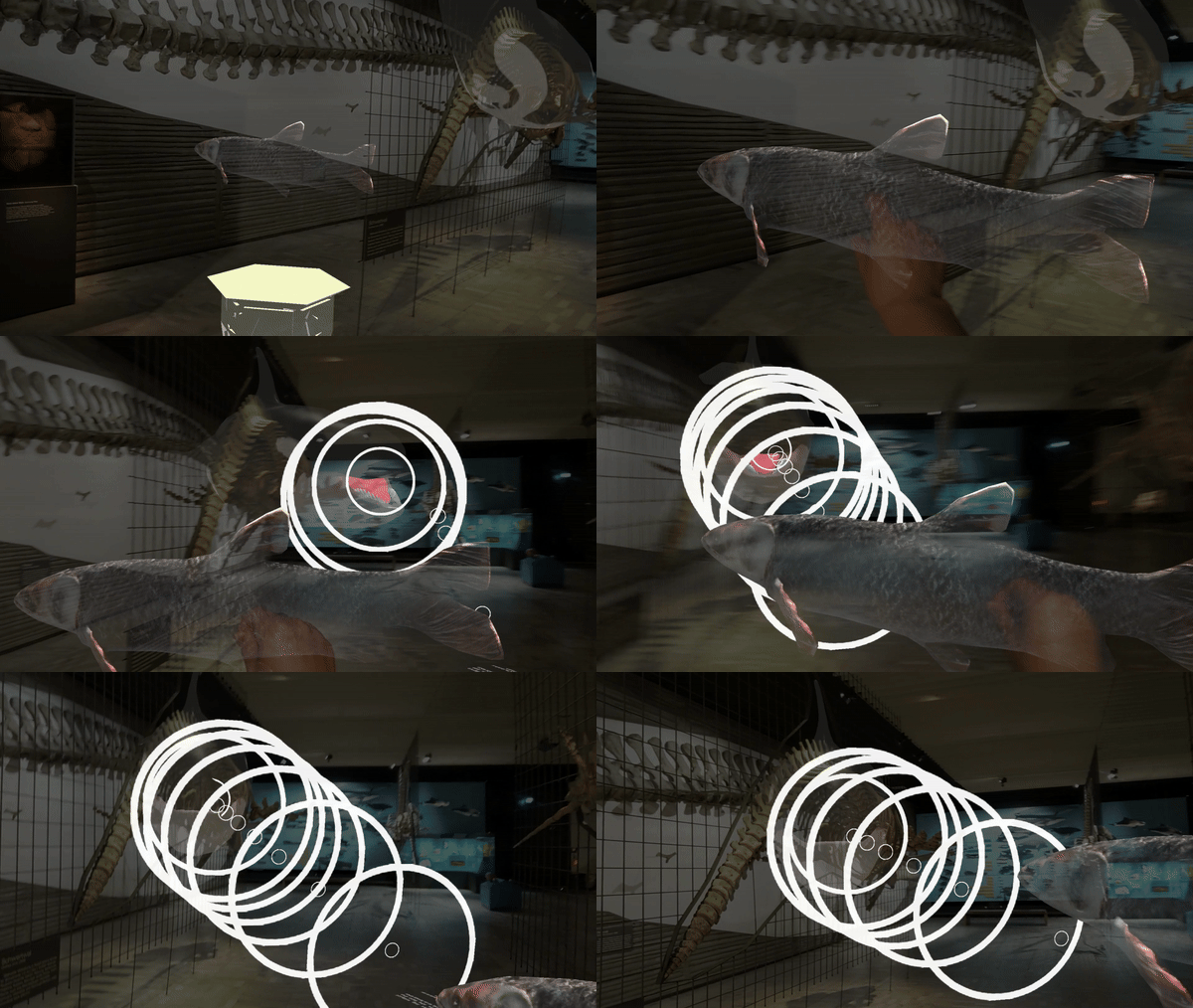
Exhibit Knowledge Trigger
A brief concept-linked interaction that prepares visitors and unlocks deeper AR content through a meaningful exhibit-related action.
Name
Exhibit Knowledge Trigger
Level and Category
Application-level pattern under the category-level class Experience Indicator.
Intent
Introduce one important exhibit concept through a brief, goal-oriented AR interaction that helps visitors recognize the relevance of the exhibit and unlocks deeper AR content after the concept has been enacted or discovered.
Rationale
In HMD-based AR museum experiences, visitors may notice visual prompts or virtual objects without understanding their interpretive purpose. An exhibit-related micro-task can make a key concept more tangible by requiring visitors to perform a short action that demonstrates cause and effect, such as moving an object, revealing a hidden mechanism, or completing a simple spatial relation.
This pattern treats activation not only as a technical trigger, but also as a meaningful meaningful transition between the physical exhibit and the subsequent AR presentation. It is especially useful when the exhibit contains a scientific, cultural, behavioural, or functional idea that can be introduced through a single embodied action before richer content is displayed.
Problem
Visitors may perceive AR prompts as decorative, optional, or disconnected from the exhibit’s core meaning. As a result, they may overlook the most important scientific or cultural insight, interact with virtual objects without understanding their purpose, or enter a presentation sequence without sufficient conceptual preparation.
This problem becomes more likely when the intended knowledge is abstract, hidden, behavioural, or difficult to observe directly from the physical exhibit alone. If the activation step does not communicate meaning, the following AR content may feel arbitrary rather than exhibit-centred.
Context
This pattern applies to HMD-AR museum experiences in which a physical exhibit contains a specific concept that benefits from a short, hands-on or embodied demonstration. It is especially relevant for exhibits that involve behaviour, function, mechanism, ecology, structure, historical use, or transformation.
The pattern assumes that supporting virtual objects, target zones, or interaction markers can be placed near the primary exhibit with sufficient spatial stability, and that visitors can complete a simple one-step or short-loop interaction without extensive instruction.
Use When
Use this pattern when:
- a single key concept should be highlighted before richer AR content is revealed;
- the concept can be represented through a short embodied or object-based interaction;
- playful interaction can support understanding without turning the experience into a long game;
- visitors should be rewarded with deeper content after completing a meaningful action;
- activation should be tied to exhibit meaning rather than simple proximity alone.
Avoid using this pattern when the concept cannot be represented through a clear short action, when the physical space does not allow safe object placement or target-zone interaction, or when the additional task would distract from rather than clarify the exhibit.
Forces
- Engagement vs. Effort: The task should invite participation and curiosity, but remain short and easy enough for first-time HMD users.
- Conceptual meaning vs. decorative action: The interaction must demonstrate or reveal a meaningful exhibit concept, rather than functioning as an arbitrary game-like action.
- Focus vs. distraction: The micro-task should foreground the exhibit concept without pulling attention too far away from the physical exhibit.
- Spatial accuracy vs. tolerance: Object placement, grab detection, and target-zone detection require sufficient precision, but should remain tolerant enough to avoid repeated failure.
- Feedback clarity vs. visual clutter: Visitors need clear confirmation of progress and success, but excessive effects can make the task feel superficial.
- Short activation vs. deeper content: The task should be brief, while the content unlocked after completion should provide the fuller interpretive explanation.
Solution
Place a short exhibit-related AR micro-task between arrival at the point of interest and the main AR presentation. The task should involve one key action that makes an important concept perceptible, such as grabbing a supporting object, moving it toward a target, matching it with an exhibit part, revealing a hidden mechanism, or completing a simple cause-and-effect relation.
The interaction should begin with a clear prompt and a visible affordance. For example, a virtual fish may appear near an orca exhibit to introduce the concept of echolocation and predation. When the visitor grabs or selects the fish, the orca can orient toward it, a pulsed sonar visualization can appear, and spatial audio can communicate the concept through sound.
Completion should be detected through a target zone or success condition. When the visitor places the object into the correct area, the system should provide immediate confirmation through visual and auditory feedback. The micro-task should then unlock the main AR content, such as a multimedia panel, narrated explanation, spatial label sequence, animation, or deeper exhibit interaction.
The trigger should not remain visually dominant after the main content begins. It should fade, transform, or reset so that visitors understand that the activation phase has ended and the presentation or exploration phase has started.
Design Parameters and Recommended Settings
- Auxiliary object position: Place the supporting virtual objects approximately 2–3 metres from the primary exhibit, adjusted according to safe movement space and exhibit visibility.
- Target-zone position: Align the target zone with a meaningful exhibit-related location, such as the orca’s mouth, a body part, mechanism, tool, or object relation.
- Drop-zone radius: Use a target radius of approximately 0.5–0.8 metres, adjusted according to tracking stability, object size, and desired difficulty.
- Grab or selection affordance: Use a subtle highlight, outline, icon, or short prompt to indicate that the supporting object can be interacted with.
- Task prompt: Use a short instruction through text, voice, or both, such as asking the visitor to move the object toward the exhibit.
- Progress feedback: Provide feedback while the object approaches the target, for example through increasing glow, pulsed animation, directional sound, or concept-related visualization.
- Success feedback: Use a short confirmation cue, such as a chime, capture tone, pulse, object animation, or exhibit response.
- Chime duration: Keep confirmation audio short, for example approximately 0.3 seconds.
- Panel fade-in: Use a short transition of approximately 0.5 seconds when the follow-up content appears.
- Success threshold: Define whether completion requires entering the target zone, releasing the object, holding it briefly, or reaching a stable proximity condition.
- Reset behaviour: If the object is dropped incorrectly, exits the interaction area, or tracking becomes unstable, reset it without disrupting the experience or provide a simple recovery cue.
- Fallback option: Provide a skip, retry, or assisted activation option if the visitor cannot complete the micro-task.
Consequences
When applied successfully, Exhibit Knowledge Trigger can make an abstract or hidden exhibit concept more tangible. It can help visitors understand why the following AR content matters, increase curiosity, and make the transition from noticing an AR opportunity to engaging with exhibit content feel more rewarding.
However, the pattern also introduces risks. If object placement is unstable, if grab or drop-zone detection fails, or if feedback is delayed, visitors may become frustrated before reaching the main content. If the micro-task is poorly aligned with the exhibit concept, it may feel gimmicky or decorative. If it is too long or too playful, it may shift attention away from the exhibit and reduce interpretive clarity. The pattern therefore requires careful tuning of task simplicity, conceptual alignment, spatial placement, detection tolerance, and feedback timing.
Related Patterns
- Alternative activation pattern
- Step-In Trigger is an alternative Experience Indicator pattern. It is simpler and more spatially generic, while Exhibit Knowledge Trigger provides a more concept-specific activation step.
- Preceding guidance patterns
- Avatar Guide can precede Exhibit Knowledge Trigger by guiding visitors to the exhibit or interaction area.
- Forward Cue-Routing can precede Exhibit Knowledge Trigger by guiding visitors through lightweight route cues and handing over to the concept-linked interaction at the destination.
- Follow-up presentation patterns
- Sequential Explanation can follow Exhibit Knowledge Trigger when the successful task should unlock a structured explanation sequence.
- AR Labelling can follow Exhibit Knowledge Trigger when the concept should be expanded through spatial labels or annotations attached to exhibit parts.
- Follow-up playful interaction patterns
- AR Exhibit Reassembler can follow or incorporate a knowledge-trigger step when reconstruction should begin from a key exhibit concept.
- AR Exhibit Feature Drawing can follow or incorporate a knowledge-trigger step when visitors should first recognize a feature before drawing or highlighting it.
- AR Object Catching can follow or incorporate a knowledge-trigger step when a short concept-linked action introduces a longer object-based interaction.
Composition Notes
Exhibit Knowledge Trigger is usually positioned between arrival at the point of interest and the main exhibit presentation. A typical composition is:
PoI Guide → Exhibit Knowledge Trigger → Experience Presenter
For example:
Avatar Guide → Exhibit Knowledge Trigger → Sequential Explanation → AR Labelling
The handoff should make the interpretive relation explicit. After success, the system should immediately reveal why the action mattered, for example by opening a panel, animation, label sequence, or narration that connects the completed task to the exhibit concept.
The trigger should not remain visually dominant after the content layer begins. If several knowledge triggers are used in one exhibition space, they should be sequenced or revealed progressively so that visitors are not faced with too many competing micro-tasks at once.
Implementation Alignment
The pattern can be implemented as a reusable knowledge-trigger module or Unity prefab that combines:
- a supporting virtual object;
- an exhibit-related target zone;
- interaction-state logic;
- grab or selection detection;
- progress feedback;
- success feedback;
- event-based handoff to subsequent presentation modules.
Relevant exposed parameters include concept label, supporting object prefab, object start position, target-zone position, drop-zone radius, grab affordance style, task prompt, progress-feedback intensity, audio cue, success animation, success threshold, reset behaviour, panel fade-in time, and fallback option.
Implementation-level events may include:
- trigger shown;
- object highlighted;
- object grabbed;
- object moved;
- target approached;
- progress feedback played;
- task completed;
- success feedback played;
- content unlocked;
- object reset;
- tracking unstable;
- trigger skipped.
These events can support debugging, system logs, observation sheets, and later evaluation of discoverability, task completion, failed pickups, placement errors, hesitation, completion time, and transition success.
Example Use
In a natural-history museum, an orca exhibit introduces the concept of echolocation through a short AR interaction. A virtual fish appears a few metres from the orca model. When the visitor approaches, the fish is highlighted and a short prompt asks the visitor to move it toward the orca.
As the fish is moved, the orca turns toward it and a pulsed cone-like sonar visualization appears, accompanied by subtle clicking sounds. When the fish reaches the orca’s mouth zone, a short capture tone confirms success, the sonar animation stops, and a concise multimedia panel explains how orcas use echolocation to locate prey. The visitor can then continue into a Sequential Explanation, AR Labelling, or another exhibit-related presentation.
