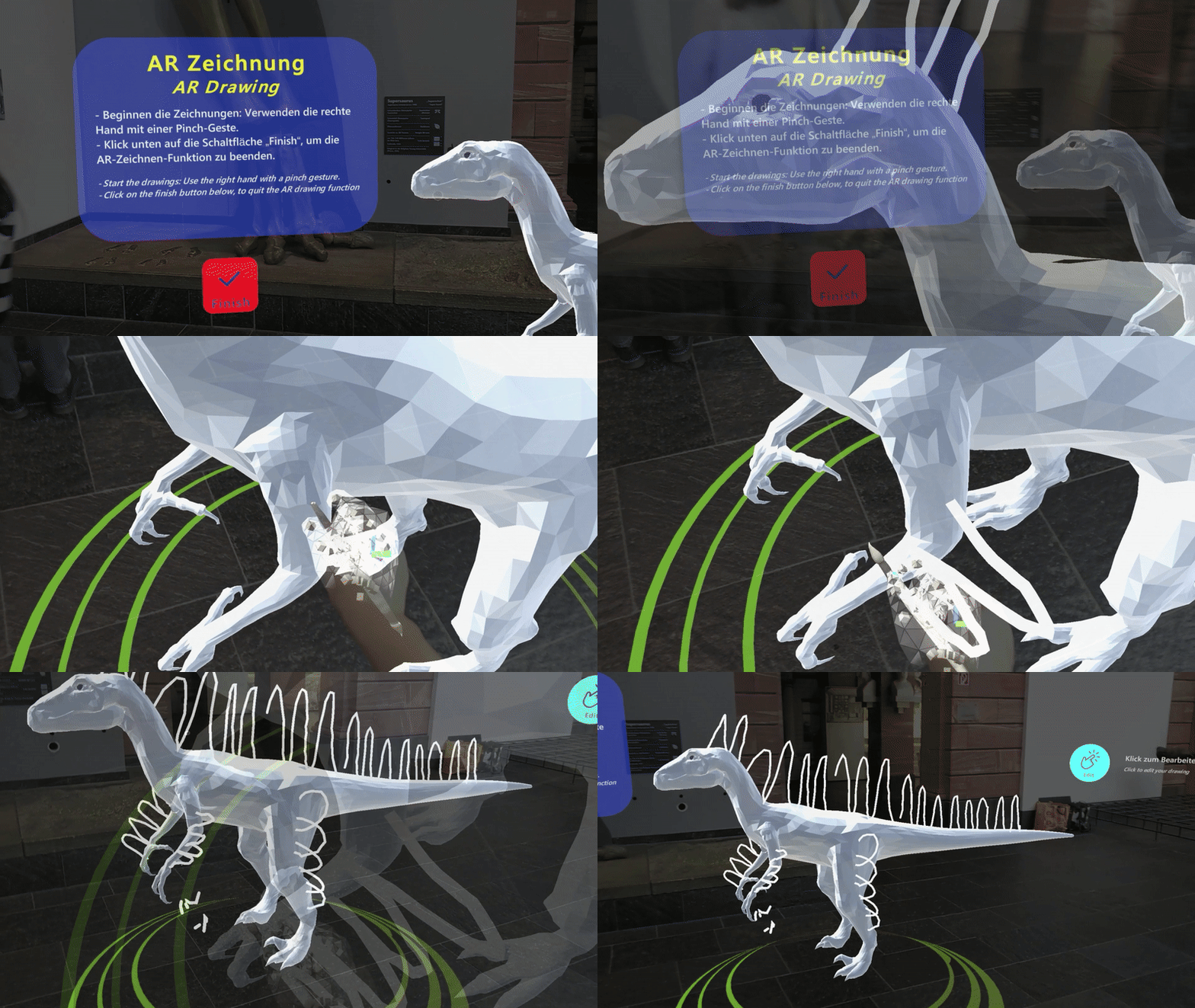
Exhibit Feature Drawing
A spatial AR drawing interaction that lets visitors mark, trace, or create interpretive exhibit features.
Name
AR Exhibit Feature Drawing
Level and Category
Application-level pattern under the category-level class Experience Presenter.
Intent
Invite visitors to actively interpret, mark, trace, or sketch uncertain, missing, or speculative exhibit features in AR and compare their own interpretation with expert, curatorial, or reference models.
Rationale
Some museum exhibits include features that are uncertain, debated, reconstructed, or difficult to perceive directly. Examples include feather form and structure, extinct coloration, surface texture, missing boundaries, restoration decisions, or hypothetical structural details. Static panels or fixed reconstructions can explain these uncertainties, but they often leave visitors in a passive role.
AR Exhibit Feature Drawing turns uncertainty into an active interpretive task. Visitors can sketch, trace, or mark possible features on a spatial canvas, a virtual model, or an exhibit-related drawing surface. This supports creative exploration while also making the distinction between evidence, hypothesis, and reconstruction more tangible.
Mechanic-based interaction logic
This pattern is based on a freehand drawing and feature-marking mechanic. Visitors mark, trace, or create possible exhibit features in AR and compare their interpretation with expert or curatorial references. The mechanic links creative input, a clearly defined sketching area, feedback, and comparison to the interpretive goal of understanding uncertain, missing, or debated exhibit features.
Problem
Visitors may find speculative or partially unknown exhibit features difficult to understand when they are presented only through static panels, fixed reconstructions, or expert descriptions. They may not recognize which aspects of the exhibit are certain, which are based on interpretation, and which are still debated.
In HMD-based AR, a complete overlay can show one possible reconstruction, but it may not communicate the reasoning process behind that reconstruction. If visitors cannot experiment with features themselves, they may miss the interpretive uncertainty and creative reasoning involved in scientific or curatorial reconstruction.
Context
This pattern applies to HMD-AR museum experiences in which visitors can draw, trace, mark, or customize virtual features on or near a physical exhibit, a reconstructed model, or a virtual proxy of an exhibit. It is especially relevant for natural-history, archaeological, art-historical, scientific, or cultural-heritage exhibits where details such as colours, textures, patterns, surface features, missing forms, or interpretive boundaries are hypothetical, debated, or difficult to see.
The pattern assumes that the system can provide a stable spatial canvas, track drawing input, render strokes in real time, and optionally compare visitor drawings with expert or reference overlays.
Use When
Use this pattern when:
- visitors should actively interpret or mark exhibit features rather than only receive information;
- creative contribution can clarify uncertainty, hypothesis, or reconstruction logic;
- visitors benefit from tracing, sketching, highlighting, or customizing specific features;
- the experience aims to support discussion, comparison, or reflective learning;
- the exhibit can be framed as a participatory reconstruction task, such as sketching feathers, markings, surface textures, restoration boundaries, or speculative missing parts.
Avoid using this pattern when drawing would reduce the perceived seriousness of sensitive cultural, historical, or ethical material, when the exhibit requires precise scientific representation that visitors cannot reasonably produce accurately enough, or when hand tracking and stroke rendering are too unstable for a satisfying drawing experience. It may also be unsuitable when the exhibition space is crowded, when visitors cannot stand long enough to draw comfortably, or when the drawing interface would cover the physical artifact.
Forces
- Creative freedom vs. scientific accuracy: Visitors should be able to explore and create, but the activity should not imply that all reconstructions are equally supported by evidence.
- Accessibility vs. expressive control: Drawing should be easy for first-time HMD users, while still providing enough control over brush size, colour, opacity, and erasing.
- Real-time feedback vs. technical stability: Strokes should appear immediately and remain spatially stable; delays, jitter, or drifting strokes can quickly frustrate visitors.
- Visibility vs. exhibit preservation: Drawing overlays should be visible enough to support interpretation, but not so dense that they hide the physical exhibit or model.
- Guided prompts vs. open-ended interpretation: Prompt zones can help visitors start drawing, but too much guidance may reduce creative exploration.
- Session-only creation vs. duration: Drawings can remain temporary, be saved for comparison, or contribute to a shared gallery; each option changes privacy, moderation, and curatorial requirements.
- Individual expression vs. shared understanding: Visitor drawings can foster ownership and discussion, but conflicting or poorly explained drawings may confuse later visitors.
Solution
Provide a spatial drawing canvas on, around, or adjacent to the exhibit and allow visitors to create freehand AR strokes using a simple input method such as pinch drawing, hand-ray drawing, gaze-assisted placement, or controller-supported drawing where available. The drawing area should be clearly bounded and connected to the relevant exhibit feature. Visitors should receive a short prompt that explains what they are invited to draw, for example feather outlines, colour patterns, missing surfaces, feature boundaries, or interpretive markings.
The drawing interaction should support a small set of essential tools: draw, erase, undo, clear, and optionally adjust brush size, colour, and opacity. Prompt zones or highlighted regions can indicate recommended starting areas without requiring visitors to follow a rigid path. Real-time stroke feedback should make the drawing action feel direct and responsive. If the visitor draws on a 3D model or exhibit surface, strokes should remain spatially registered to the intended surface or drawing plane.
After the drawing is complete, the system should support interpretation. This may be done by showing a reference overlay, expert reconstruction, consensus model, or curatorial explanation for comparison. The system may also allow visitors to save their sketch within the session, compare multiple alternatives, or view a moderated gallery of prior visitor interpretations. The drawing should be framed as a way to reason about evidence and possibility, not simply as decorative painting.
Design Parameters and Recommended Settings
- Drawing surface: Use a stable spatial canvas attached to the exhibit, a nearby virtual model, or an offset drawing plane. Avoid surfaces that require visitors to draw through the physical object or at uncomfortable angles.
- Brush size: Provide adjustable brush widths of approximately 1–10 cm in virtual space. Use a medium default size for first-time users and allow larger brushes for broad surface features.
- Opacity: Provide opacity levels from approximately 20–100%, preferably in simple increments. Lower opacity supports comparison with the exhibit surface; higher opacity supports clear markings.
- Colour options: Provide a small palette that matches the exhibit theme, reconstruction hypotheses, or feature categories. Avoid overly large colour palettes that increase UI complexity.
- Input method: Use pinch drawing, hand-ray drawing, gaze-assisted drawing, or simplified stroke placement depending on device capability and visitor familiarity.
- Stroke feedback: Render strokes immediately during drawing. Keep visual delays low enough that visitors can understand the relation between hand movement and stroke placement.
- Prompt zones: Highlight recommended drawing regions, such as wings, crests, skin areas, missing fragments, or surface patterns. Prompt zones should be subtle and fade when drawing begins.
- Undo and erase: Provide simple undo and erase functions. These controls are important because visitors may otherwise hesitate to experiment.
- Layering: Optionally separate visitor strokes, guide overlays, and expert reference overlays into different layers so that they can be toggled or faded independently.
- Comparison overlay: Provide a reference or expert reconstruction overlay after drawing, or through a toggle, so that visitors can compare their interpretation with curated evidence.
- Completion condition: Define whether completion is manual, time-based, or region-based. A manual Finish button gives visitors control, while a region-based completion can support structured tasks.
- Gallery persistence: Decide whether drawings are temporary, saved for the current session, or submitted to a shared gallery. Shared galleries require moderation, privacy handling, and curatorial framing.
- Fallback behaviour: If stroke tracking becomes unstable, simplify the drawing mode, increase smoothing, provide larger brush defaults, or allow visitors to select predefined feature shapes instead of drawing freely.
Consequences
When applied successfully, AR Exhibit Feature Drawing can deepen engagement by turning uncertain or subtle exhibit features into an active interpretive task. It supports creative exploration, visitor ownership, and discussion, while helping visitors understand the difference between evidence, hypothesis, and reconstruction. It can also make scientific or curatorial uncertainty more tangible by allowing visitors to compare their own drawing with expert models.
However, the pattern also introduces risks. Poor drawing controls, hand-tracking errors, delays, or unstable stroke anchoring can quickly frustrate visitors. Too many tools can make the interface feel like a complex graphics application rather than a museum interaction. Visitor drawings may obscure the exhibit, and shared or persistent sketches may confuse later visitors if they are not clearly separated from expert reconstructions. The pattern therefore requires careful tuning of input simplicity, stroke stability, tool complexity, prompt design, comparison framing, and persistence policy.
Related Patterns
- Preceding activation patterns
- Step-In Trigger can precede AR Exhibit Feature Drawing by activating the drawing task at a safe viewing and interaction position.
- Exhibit Knowledge Trigger can precede AR Exhibit Feature Drawing when a short concept-specific action should introduce why the feature is uncertain or important.
- Preceding guidance patterns
- Avatar Guide can indirectly precede AR Exhibit Feature Drawing by guiding visitors to the point of interest before activation and presentation.
- Forward Cue-Routing can indirectly precede AR Exhibit Feature Drawing by guiding visitors through lightweight route cues before activation and presentation.
- Complementary presentation patterns
- Sequential Explanation can be used before the drawing task to introduce the feature, during the task to stage prompts, or after completion to explain the expert comparison.
- AR Labelling can prepare the drawing task by identifying relevant exhibit parts or feature regions.
- Related playful presentation patterns
- AR Exhibit Reassembler is a related playful presentation pattern focused on assembling missing parts, while AR Exhibit Feature Drawing focuses on marking, tracing, or creating surface features.
- AR Object Catching is another game-mechanics-based pattern, but it emphasizes embodied catching or defending rather than creative sketching.
Composition Notes
AR Exhibit Feature Drawing is usually used as the main exhibit-centred interaction after the visitor has reached and activated a point of interest. A typical composition is:
PoI Guide → Experience Indicator → AR Exhibit Feature Drawing
For example:
Avatar Guide → Step-In Trigger → Sequential Explanation / AR Labelling → AR Exhibit Feature Drawing
The task should begin with a clear prompt and a clearly defined drawing area. Visitors should know what they are drawing, where they can draw, and how to finish. Sequential Explanation or AR Labelling can introduce the relevant feature before visitors begin drawing.
After completion, the system should not leave the sketch uninterpreted. A reference overlay, expert reconstruction, or short explanation should connect the visitor’s drawing back to the exhibit evidence. If a gallery is used, the gallery should be clearly framed as visitor interpretation rather than authoritative reconstruction.
Implementation Alignment
The pattern can be implemented as a reusable drawing module or Unity prefab that combines:
- a spatial canvas;
- stroke renderer;
- input detection;
- brush settings;
- erase and undo functions;
- prompt-zone logic;
- layer management;
- reference-overlay control;
- completion state;
- optional gallery storage;
- event-based transitions.
Relevant exposed parameters include drawing-surface anchor, canvas bounds, brush size range, default brush size, opacity range, colour palette, stroke smoothing, input method, prompt-zone positions, guide overlay transparency, expert overlay asset, undo depth, erase mode, completion action, save policy, gallery visibility, and fallback mode.
Implementation-level events may include:
- drawing mode started;
- prompt zone shown;
- stroke started;
- stroke updated;
- stroke ended;
- brush changed;
- colour changed;
- transparency changed;
- undo used;
- erase used;
- drawing cleared;
- reference overlay shown;
- drawing completed;
- drawing saved;
- gallery opened;
- tracking unstable;
- drawing mode exited.
These events can support debugging, system logs, observation sheets, and later evaluation of drawing duration, tool use, repeated undo, completion rate, comparison use, tracking errors, and transition success.
Example Use
In a natural-history museum, visitors explore a Deinonychus exhibit where feather form and structure and surface appearance are presented as scientifically informed but partly speculative reconstruction topics. After a short prompt, a bounded drawing area appears around the virtual model. Visitors use pinch drawing or hand-ray drawing to sketch feather outlines, colour patterns, or surface markings on the model.
They can adjust brush size, opacity, and colour, erase mistakes, and use undo if needed. After finishing, an expert or reference reconstruction fades in as a comparison overlay. The system then explains which parts of the visitor’s drawing are consistent with current evidence and which parts remain speculative or interpretive. Optionally, the visitor can save the sketch to a moderated gallery of visitor interpretations.
