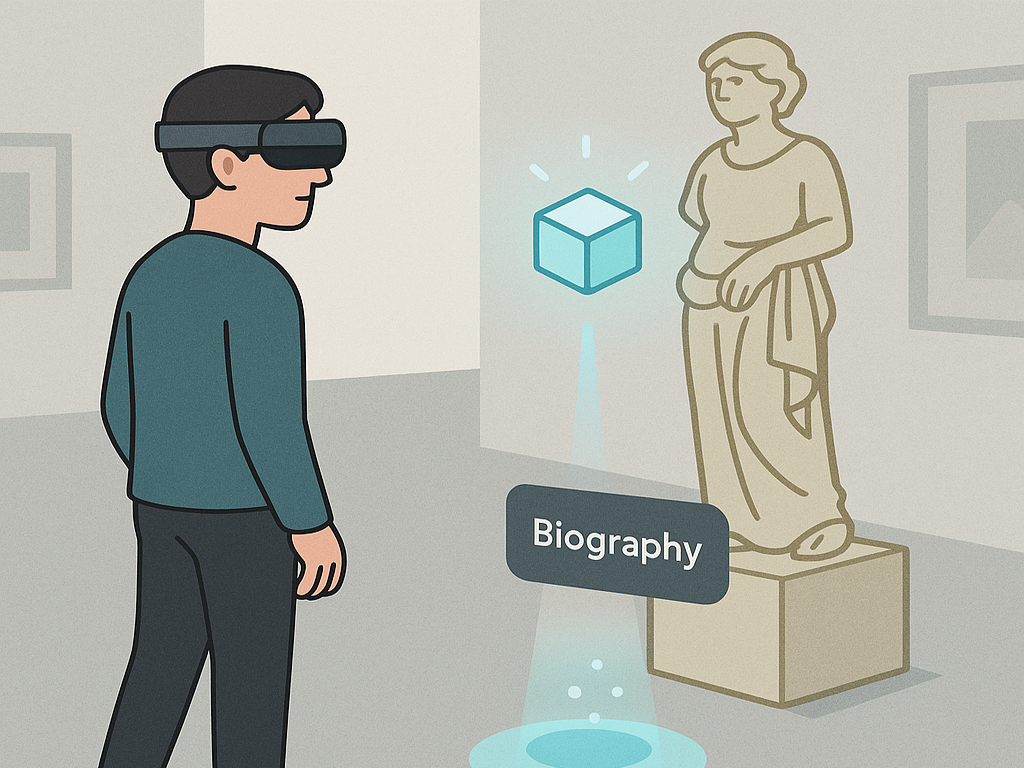
Experience Indicator
A category-level pattern class for making AR-enabled exhibits discoverable and supporting the transition from arrival to activation.
Name
Experience Indicator
Level and Category
Category-level pattern class in the consolidated pattern system.
It groups application-level patterns that make AR-enabled exhibits discoverable and support the transition from noticing an opportunity to activating an HMD-AR experience.
Intent
Help visitors discover, recognize, and activate AR experiences at points of interest through clear, consistent, and context-sensitive indicators.
The category supports the visitor journey from exhibit arrival to AR experience activation and can be instantiated through application-level patterns such as Step-In Trigger and Exhibit Knowledge Trigger.
Rationale
In HMD-based AR museums, visitors do not automatically know which exhibits contain AR content, where an AR experience begins, or what action is required to start it. This problem is especially important when only selected exhibits are augmented and when visitors are first-time HMD users.
The Experience Indicator class separates the general activation-support function from its concrete representation. This allows the system to maintain consistent discoverability, activation feedback, and lifecycle semantics across exhibits while allowing different activation forms, such as spatial entry zones, proximity triggers, concept-specific micro-tasks, voice prompts, or assisted activation.
As a category-level class, Experience Indicator defines the shared interaction role, variation dimensions, state logic, and composition position of activation patterns without requiring one fixed shape, distance, timing, or gesture.
Problem
Visitors may overlook AR-enabled exhibits, hesitate after arriving at a point of interest, or fail to understand how an AR experience should be started. Physical exhibits do not always provide visible signs of interactivity, and HMD-based AR content may remain hidden until triggered.
If the activation opportunity is not clearly indicated, visitors may miss important content, waste time searching for controls, or require external assistance. If indicators are inconsistent or visually intrusive, they may disrupt the exhibition experience and reduce trust in the system.
A reusable indicator structure is therefore needed so that different activation mechanisms can support discoverability, confirmation, feedback, recovery, and handoff in a consistent way.
Context
This category applies to HMD-based AR museum and exhibition experiences in which visitors arrive at a point of interest and need to discover or activate exhibit-related AR content. It is especially relevant when:
- AR content is embedded in only some exhibits;
- the physical environment does not include explicit markers for AR interactivity;
- visitors explore freely or arrive through a guided route;
- different exhibits require different activation mechanisms;
- the system needs a consistent activation vocabulary across multiple exhibits;
- activation should hand over clearly to exhibit-related presentation or interaction patterns.
The category assumes that the system can identify relevant points of interest, display local indicators, and detect visitor activation through proximity, dwell, gesture, voice, selection, or a short task.
Use When
Use this category-level pattern whenever an HMD-AR exhibit experience needs a clear transition from physical exhibit viewing to digital augmentation. It is appropriate when visitors must know that an AR experience is available, where they should stand or look, and what action will start the experience.
It is also useful when multiple exhibits in the same space require a consistent activation vocabulary while still allowing different activation mechanisms for different exhibit types.
Do not rely on this category as a separate design layer when the AR content is always visible, when activation is automatic and requires no visitor interpretation, or when the exhibit context makes additional indicators unnecessary. In such cases, the activation function may be integrated directly into a presentation pattern.
Forces
- Discoverability vs. distraction: Indicators must stand out enough to be noticed, but should not clutter the scene or dominate the exhibit.
- Consistency vs. local adaptation: The system should use a recognizable visual and interaction language, while still adapting to different exhibits, layouts, and activation needs.
- Immediate feedback vs. subtlety: Activation should be confirmed clearly, but feedback should remain appropriate for the museum atmosphere.
- Automatic activation vs. visitor control: Proximity-based activation is easy to use, but explicit confirmation may be needed when accidental activation is likely.
- Accessibility vs. interaction richness: Activation cues should work for diverse visitors and device conditions, while still supporting richer concept-specific interactions when appropriate.
- Indicator persistence vs. visual cleanliness: Always-visible indicators increase discoverability, but on-demand or proximity-based indicators reduce visual clutter.
- Technical reliability vs. interpretive expressiveness: Simple triggers are robust, while richer knowledge-based triggers may communicate meaning more effectively but require more reliable interaction detection.
Solution
Define a shared indicator logic that governs how visitors discover, approach, confirm, activate, and exit AR experiences at exhibits. The category should not prescribe one fixed shape, distance, timing, or gesture. Instead, it establishes system-level guarantees: AR opportunities should be discoverable without excessive clutter, activation states should be understandable, feedback should be immediate and multimodal where possible, and similar activation semantics should be reused across exhibits.
A typical lifecycle includes:
Discover → Candidate → Confirm → Activate → Exit / Recover
In the Discover state, the system signals that an exhibit has AR content. In the Candidate state, the visitor is close enough or oriented enough for the system to make the activation option more explicit. In the Confirm state, the visitor performs or completes the required activation condition. In the Activate state, the AR experience starts and the indicator hands over to the presentation layer. In the Exit / Recover state, the system allows visitors to leave, retry, or recover from failed activation.
Concrete application-level patterns instantiate this lifecycle differently. Step-In Trigger uses a spatial entry zone and dwell-based activation. Exhibit Knowledge Trigger uses a short concept-specific interaction to unlock deeper content. Other future indicators may use voice, gaze, object recognition, physical markers, or curator-assisted activation, as long as they preserve the shared discoverability, feedback, and handoff logic.
Design Parameters and Recommended Settings
- Placement strategy: Decide whether the indicator is ambient and visible from a distance, locally anchored near the exhibit, revealed only on approach, or tied to a specific interaction zone.
- Activation mode: Use proximity, dwell, hand selection, gaze dwell, voice command, object manipulation, or concept-specific task completion depending on the intended level of agency and robustness.
- State visibility: Define how the indicator changes between discoverable, candidate, confirmable, activated, inactive, and recovery states.
- Persistence level: Decide whether indicators are always visible, shown on approach, revealed after guidance arrival, or hidden until the visitor looks toward the exhibit.
- Feedback mix: Combine visual feedback with optional spatial audio, text prompts, animation, or body-based feedback where available. Use at least two feedback channels when accessibility or environmental uncertainty is important.
- Feedback intensity: Tune glow, pulse, sound, motion, and label visibility so that activation is clear without producing abrupt transitions.
- False-activation prevention: Use dwell time, confirmation steps, proximity thresholds, or task completion when accidental activation is likely.
- Accessibility settings: Support readable labels, sufficient contrast, non-colour-dependent cues, adjustable audio, and alternative activation methods where possible.
- Recovery behaviour: Define what happens when the visitor fails to activate, leaves the zone, loses tracking, or activates the wrong exhibit.
- Logging points: Record discovery, approach, confirmation, activation, cancellation, recovery, and exit events to support usability analysis and system debugging.
Consequences
When applied successfully, the Experience Indicator category increases the discoverability of AR content, reduces hesitation at exhibits, and supports a smoother transition from physical viewing to digital interaction. It also provides a reusable activation vocabulary across an exhibition, making the AR system easier to learn for first-time visitors.
However, the category also introduces risks. Overuse of indicators can visually overload the exhibition space. Inconsistent activation semantics can confuse visitors and break expectations. Too much automation can reduce visitor control, while overly explicit confirmation can slow down the visit. The category therefore requires careful balancing of discoverability, subtlety, activation reliability, feedback clarity, and local exhibit meaning.
Related Patterns
- Application-level patterns in this category
- Step-In Trigger instantiates this category through a floor-based entry zone that visitors enter to activate the AR experience.
- Exhibit Knowledge Trigger instantiates this category through a short concept-specific interaction that unlocks deeper AR content.
- Preceding guidance patterns
- Avatar Guide commonly precedes Experience Indicator by guiding visitors to the point of interest where an indicator becomes relevant.
- Forward Cue-Routing commonly precedes Experience Indicator by guiding visitors through lightweight route cues before the indicator becomes active.
- Follow-up presentation patterns
- Sequential Explanation commonly follows Experience Indicator after activation when visitors need structured exhibit-related content.
- AR Labelling commonly follows Experience Indicator after activation when visitors need spatially anchored labels or component-level explanations.
- AR Exhibit Reassembler commonly follows Experience Indicator when visitors should reconstruct missing or fragmented exhibit components.
- AR Exhibit Feature Drawing commonly follows Experience Indicator when visitors should draw, trace, or mark interpretive exhibit features.
- AR Object Catching commonly follows Experience Indicator when visitors should respond to virtual threats or objects around an exhibit.
Composition Notes
Experience Indicator normally occupies the transition between guidance and presentation. A typical composition is:
PoI Guide → Experience Indicator → Experience Presenter
For example:
Avatar Guide → Step-In Trigger → Sequential Explanation → AR Labelling
or:
Forward Cue-Routing → Exhibit Knowledge Trigger → AR Object Catching
The handoff from guidance should be clear. When visitors arrive at the point of interest, guidance cues should reduce intensity or end, and the indicator should become visually primary.
The handoff to presentation should also be explicit. Once activation succeeds, the indicator should fade, transform, or become secondary so that visitors understand that the main AR experience has begun. If several AR-enabled exhibits are nearby, only the relevant or nearest indicator should become active, while others remain hidden or shown less prominently.
Implementation Alignment
As a category-level pattern, Experience Indicator can be implemented as a shared activation-orchestration layer that coordinates exhibit availability, indicator visibility, activation state, confirmation logic, feedback, recovery, and handoff events.
Application-level prefabs such as Step-In Trigger and Exhibit Knowledge Trigger can subscribe to this shared state logic while using different visual representations and activation methods.
Relevant implementation data include:
- point-of-interest metadata;
- exhibit availability state;
- indicator anchors;
- activation zones;
- dwell thresholds;
- interaction-task definitions;
- feedback assets;
- fallback options;
- logging points.
Implementation-level events may include:
- indicator discovered;
- candidate detected;
- visitor approached;
- confirmation started;
- confirmation cancelled;
- activation confirmed;
- experience activated;
- activation failed;
- recovery shown;
- indicator hidden;
- experience exited.
These events can support debugging, usability observation, analytics, and comparison between different activation strategies.
Example Use
In a natural-history museum, visitors arrive near an AR-enabled whale exhibit after following a guidance pattern. The Experience Indicator class determines how the system reveals the activation opportunity.
In one version, the category is instantiated as a Step-In Trigger: a glowing floor circle appears at a safe viewing position, and the visitor activates the experience by stepping into it. In another version, it is instantiated as an Exhibit Knowledge Trigger: the visitor completes a short exhibit-related interaction before deeper content is unlocked.
In both versions, the indicator confirms activation and hands over to an Experience Presenter pattern such as Sequential Explanation or AR Labelling.
